Quick scan to undelete
Just deleted something? DéjàFile reads your drive’s own records to bring files back with their original names, folders and dates intact.
Free data recovery for Windows
DéjàFile recovers deleted files, photos and documents in minutes — with no cost, no account and no fuss. One small download that does what tools charging $70 do.
Why DéjàFile exists
Most recovery tools scan for free, show you that your files can be brought back, then ask for $70–$100 before they’ll hand anything over. DéjàFile does the same job — often better — and gives your files straight back. No paywall, no trial, no locked features, no catch.
Others charge to unlock the files they already found. DéjàFile just gives them back.
What it does
A full recovery toolkit in a tiny installer under 2 MB, built to be calm and clear even if you’ve never heard the word “sector”.
Just deleted something? DéjàFile reads your drive’s own records to bring files back with their original names, folders and dates intact.
Formatted the wrong drive, or hit corruption? DéjàFile reads the raw disk and rebuilds files from their contents — even when the filesystem is gone.
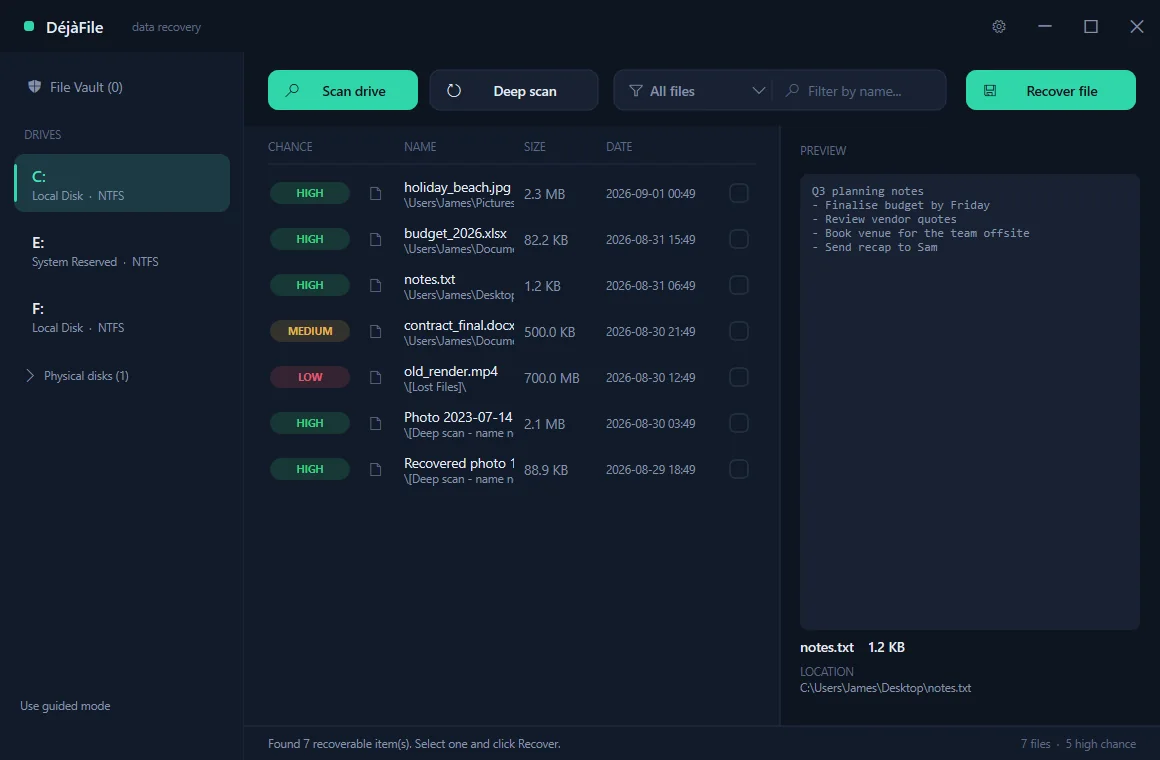
Every file is graded HIGH, MEDIUM or LOW before you lift a finger, so you know what will come back cleanly. No paying to find out.
After recovery DéjàFile opens each file to confirm it works and marks it verified or damaged. Most tools just hand you a file and walk away.
Select any file to see its contents, thumbnail, size and location first — so you recover exactly what you meant to.
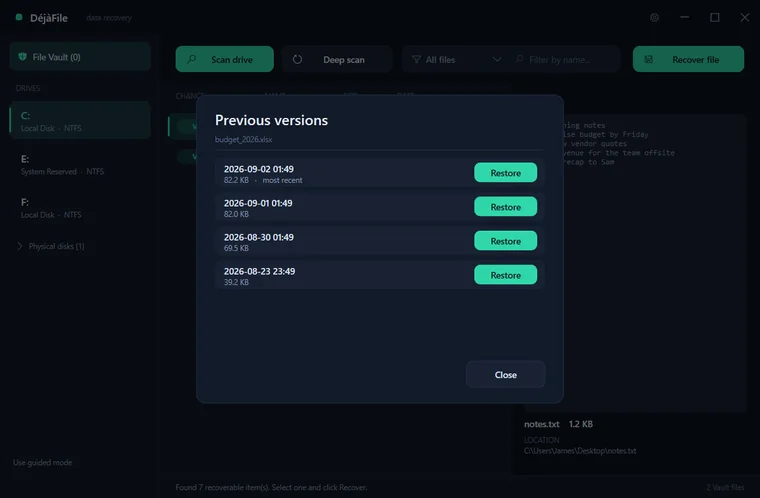
Turn on the File Vault and DéjàFile quietly keeps safe copies of files you care about, so you can step back to an earlier version any time you save over your work.
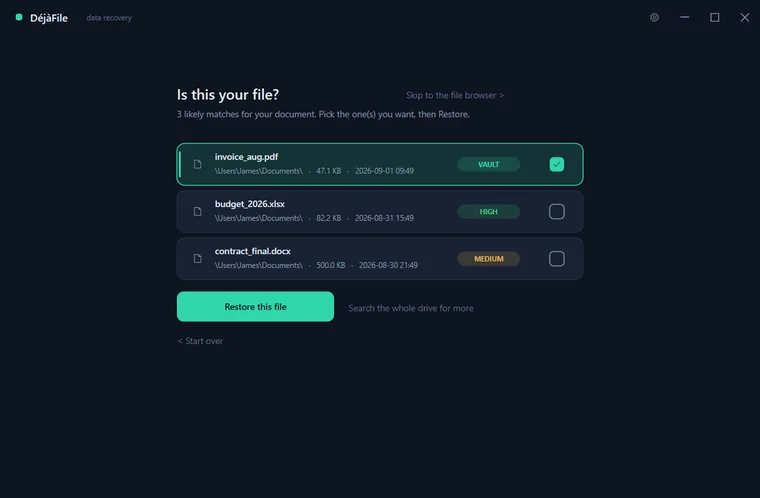
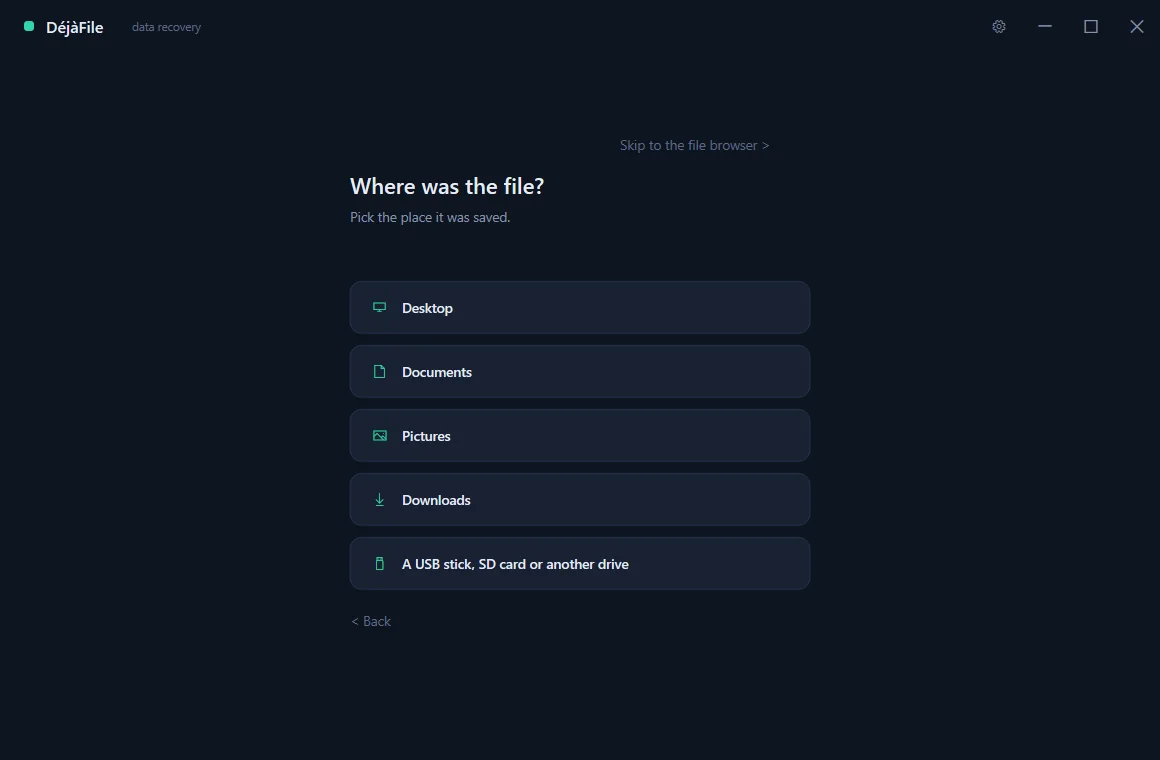
Not technical? A calm step-by-step wizard asks where the file was and what it was called, then shows you the matches. No jargon, no disk concepts.
Tick-box selection, select-all, filters by type and name, right-click menu and keyboard shortcuts — for a single photo or a whole folder at once.
No upload, no telemetry, no account. DéjàFile runs entirely offline and only ever writes recovered files where you tell it to.
Recovery you can trust
When recovery finishes, DéjàFile opens each file to check it really works and badges it verified, damaged or unknown. You find out before you rely on it — not weeks later when you try to open it.
HIGH MEDIUM LOW DéjàFile grades every result before you recover, so there are no surprises.
How it works
A tiny installer, under 2 MB — no bundled toolbars, no account, nothing sneaky. It sets up in seconds and opens straight away.
Pick the drive you lost the file from. A quick scan finds recently deleted files; a deep scan digs deeper after a format.
Check the recoverability rating, preview the file, then recover it to a safe place. DéjàFile confirms it opens afterwards.
File Vault & versioning
Beyond recovery, DéjàFile can look forward. Switch on the File Vault and it quietly keeps safe copies of the files you care about as they change. A per-file version timeline lets you step back through earlier versions and restore any one of them — so saving over your work is no longer a disaster.
DéjàFile vs typical paid tools
| Feature | DéjàFile | Typical paid tool |
|---|---|---|
| Price | Free forever | $70–$100 |
| Download size | Under 2 MB | 20–100+ MB |
| Account required | No | Often |
| See what’s recoverable before you pay | DéjàFile: yes | no |
| Verifies the file actually opens | DéjàFile: yes | rare |
| Deep scan after formatting | DéjàFile: yes | Paid tier |
| Runs 100% offline & private | DéjàFile: yes | Varies |
| Languages | 24 | A few |
Speaks your language
Every language is built into the same tiny installer and chosen automatically from your Windows settings, with a switcher in the system tray. Arabic and Hebrew flip the entire interface right-to-left — sidebar, columns and all.
Read this site in:
Questions
Yes — free forever, with every feature unlocked. No trial, no watermark, no “recover 500 MB then pay”, and no account. It is freeware.
Yes. DéjàFile runs entirely on your computer. Nothing is uploaded, there is no telemetry and no account. It only reads your disks, and writes recovered files to a location you choose.
Reading a drive directly — the only way to find deleted files — requires elevation on Windows. That is inherent to any recovery tool, and we state it plainly so it never feels suspicious.
Windows 7 SP1, 8, 8.1, 10 and 11, both 32-bit and 64-bit. It needs no .NET, Visual C++ redistributable or Java, and runs on a fresh Windows install with nothing else on it.
Yes. The deep scan reads the raw drive and rebuilds files from their internal signatures even after a format, corruption or a wiped partition.
NTFS, FAT12, FAT16, FAT32 and exFAT — internal drives, external drives, USB sticks, SD cards and camera memory cards.
For recently deleted files, yes — names, folders and dates. For files rebuilt by a deep scan the original name no longer exists on the disk, so DéjàFile gives them a clear, honest name (and uses real detail like a photo’s capture date where it can).
Under 2 MB. DéjàFile comes as a tiny installer — no bundled toolbars and no account — that sets up in a few seconds. It stays one of the smallest recovery tools you will find.
Completely. DéjàFile never needs a connection to find or recover your files.
One small download. No account, no upsell, no catch. Just your files, back where they belong.
Download DéjàFile for Windows